Gadista Script: The Elegant Typeface for Memorable Brands
There's a particular kind of design challenge that comes up again and again: you need a font that feels personal, refined, and unmistakably human, but it still has to hold its own in professional contexts. Maybe you're finalizing a wedding invitation suite and want something that whispers romance without looking cheap. Perhaps you're building a brand identity for a boutique bakery, and the logo needs to feel warm and artisanal. Or you're creating social media graphics that have to stop someone mid-scroll with a single, beautifully rendered word. Gadista Script is the kind of typeface that steps into those moments with quiet confidence.
What Makes This Script Font Stand Out
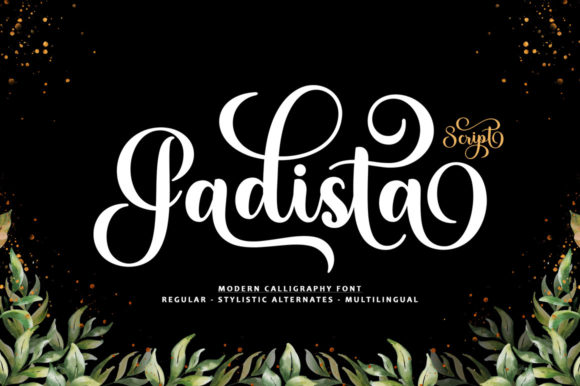
At its core, Gadista Script is a stylish and incredibly elegant script font. It has the fluidity of real handwriting, but it's been refined and polished in ways that raw brush lettering often isn't. The letterforms carry a natural rhythm — the strokes connect smoothly, the curves feel intentional, and there's a consistency across the full character set that makes it genuinely usable in professional design work.
What sets it apart from a lot of handwritten fonts is restraint. Some script typefaces go overboard with flourishes, making them nearly impossible to read at smaller sizes. Gadista Script strikes a balance. The swashes and alternates are there when you want them, but the base characters are clean enough to work in body-level sizes when paired with a complementary typeface. That versatility is what makes it a practical choice rather than a novelty font you download once and never use again.
The PUA encoding is worth highlighting because it matters in everyday use. Every glyph and swash is accessible without special software or complicated workarounds. Whether you're working in Adobe Illustrator, Photoshop, Canva, or even a basic design app on your phone, you can pull up the full character map and drop in alternates with ease. That accessibility removes a friction point that trips up a lot of people when they're working with premium fonts.
Where This Typeface Truly Shines
Think about the projects where typography carries emotional weight. Wedding invitations are an obvious starting point — Gadista Script looks stunning on wedding invitations, thank you cards, quotes, greeting cards, logos, business cards and every other design which needs a handwritten touch. But its usefulness extends far beyond event stationery.
For small business owners building a brand identity, a script font like this one can anchor an entire visual system. Imagine it as the wordmark for a skincare line, a florist, or a specialty coffee roaster. Paired with a clean sans serif for supporting text, it creates a brand voice that feels approachable yet elevated. That combination — personality in the headline, clarity in the details — is one of the most effective strategies in modern typography.
Packaging design is another area where Gadista Script earns its place. When a customer picks up a product from a shelf, the font on the label is doing a lot of silent persuasion. A handwritten script on a candle jar or a box of artisan chocolates signals craftsmanship and care. It tells the buyer that someone put thought into every detail, including the typeface.
Social media graphics benefit enormously from a font with this kind of visual pull. Instagram posts, Pinterest pins, and Facebook ads all compete in a crowded visual landscape. A single word rendered in Gadista Script — "Celebrate," "Dream," "Create" — can become the focal point of an entire graphic. It draws the eye, sets a mood, and communicates tone before the viewer even reads the rest of the copy.
Pairing Gadista Script with Other Typefaces
No script font should work alone. One of the most practical things you can do with Gadista Script is pair it thoughtfully with a serif font or a sans serif font that complements its personality without competing with it.
A geometric sans serif like Montserrat or Poppins gives the combination a modern, editorial feel. The contrast between the organic flow of the script and the structured geometry of the sans serif creates visual tension that keeps a layout interesting. This pairing works well for websites, blog headers, and digital products like e-books or online course materials.
If you want something warmer and more traditional, try pairing it with a transitional serif like Lora or Source Serif Pro. The result feels classic and trustworthy — ideal for print materials like brochures, menus, or editorial layouts. The serif adds a layer of formality that grounds the script's expressiveness.
The key is to let the script do one job. Use it for headlines, pull quotes, or accent words. Let the companion typeface handle paragraphs, captions, and interface elements. When each font has a clear role, the overall design feels cohesive rather than chaotic.
Practical Tips for Working with Script Fonts
Readability should always be your first consideration. A beautiful font that nobody can read defeats its own purpose. Gadista Script performs well at medium to large sizes, but like any script typeface, it loses legibility when squeezed into tight spaces or rendered too small. Test it at the actual size it will appear in your final design — on a phone screen, on a printed card, on a product label — before committing.
Spacing matters more with script fonts than with most other categories. Because the letters connect, tracking them too wide breaks the natural flow. Too tight, and the characters start overlapping in awkward ways. Most design applications let you adjust letter spacing, so take a few minutes to fine-tune it for each project.
Color contrast is another overlooked factor. Gadista Script in light gray on a white background will disappear. Make sure there's enough contrast between the text and its background, especially for accessibility. Dark text on a light background, or white text on a rich, saturated color, will let the font's details come through clearly.
Also, take the time to explore the alternate characters and swashes. That's where a lot of the creative potential lives. A slightly different 't' crossbar or a more elaborate capital 'G' can completely change the feel of a wordmark. Since the font is PUA encoded, accessing these alternates is straightforward — use a character map tool or your design software's glyph panel to browse what's available.
Licensing and Commercial Use
If you're planning to use Gadista Script in commercial work — logos, products for sale, client projects, merchandise — make sure you understand the licensing terms that come with your purchase. Most premium font licenses distinguish between personal and commercial use, and some have specific restrictions around embedding fonts in digital products or modifying letterforms. Read the license agreement carefully before you start a client project, and keep a record of your purchase. It's a small administrative step that protects you and your clients down the road.
Building a Visual Identity That Feels Intentional
Typography is one of the most powerful tools in a designer's toolkit, and yet it's often the last thing people think about. Choosing the right typeface — one that aligns with the tone, audience, and purpose of a project — can elevate everything around it. Gadista Script works because it doesn't try to be everything. It's a creative font with a clear point of view: elegant, personal, and versatile enough to adapt to a wide range of design contexts.
Whether you're a brand strategist refining a client's visual identity, a crafter designing invitations for a milestone event, or a content creator building a cohesive aesthetic across platforms, having a reliable script font in your collection saves time and raises the quality of your output. It's one of those design assets that quietly improves everything it touches.